“How much will my app cost?” is usually the first question founders ask, and the honest answer is: it depends on what the app has to do. That isn’t a dodge. A food delivery app and a simple appointment-booking app are both “apps”, but one has three user types, live tracking and payments, while the other has a calendar and a confirmation SMS.
This guide gives you real numbers for India in 2026, shows where the money goes, and explains how to get a version of your idea into users’ hands without spending the full budget upfront.
Typical app development costs in India (2026)
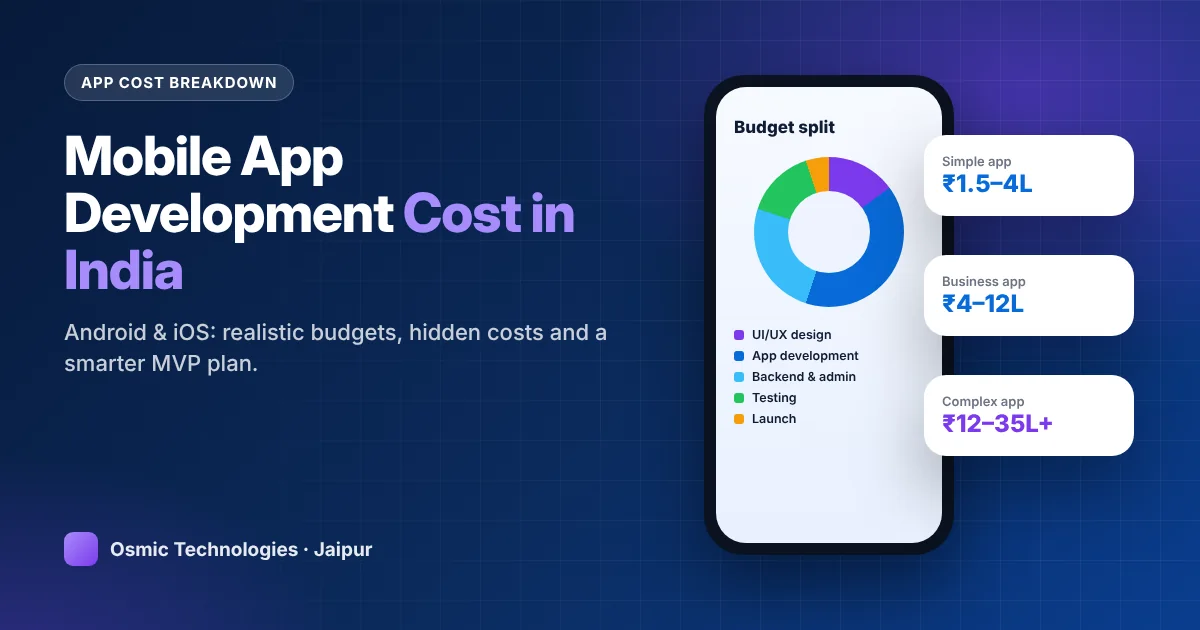
- Simple app (informational, catalogue, booking with a basic admin): ₹1.5 – ₹4 lakh
- Medium-complexity app (user accounts, payments, notifications, dashboard): ₹4 – ₹12 lakh
- Complex app (marketplace, delivery, ride-hailing, fintech, real-time chat): ₹12 – ₹35 lakh+
These ranges assume a professional team in India with design, development, backend, testing and store publishing included. Freelancers may quote lower; large international agencies quote far higher for the same scope.
Where the money actually goes
When you look inside a typical app budget, the screens you see are only part of the story.
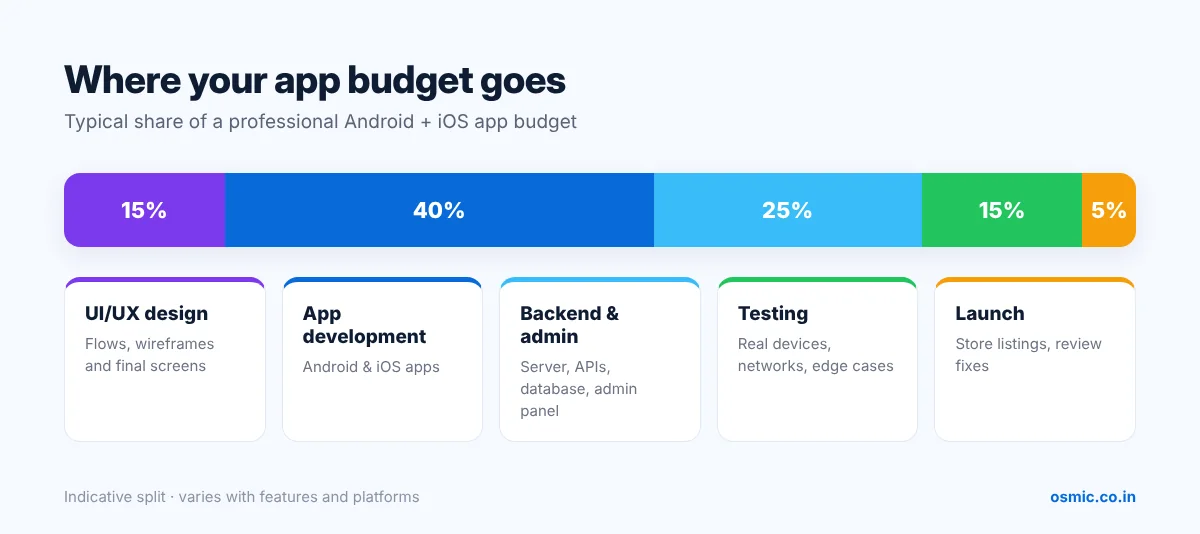
- UI/UX design (10–15%): user flows, wireframes and the final screens. Good design reduces development changes later.
- App development (35–45%): building the Android and iOS apps themselves.
- Backend, APIs and admin panel (20–30%): the server, database and the dashboard your team uses to manage users, orders and content. This is the part people forget to budget for.
- Testing and QA (10–15%): real devices, different screen sizes, slow networks, edge cases.
- Launch and store publishing (around 5%): Play Store and App Store listings, compliance and review fixes.
Features that push the cost up
Here are the features that most often turn a ₹3 lakh app into a ₹10 lakh app, roughly from smallest to largest impact:
- Social login and OTP-based sign-up
- Push notifications with segmentation
- In-app payments, wallets and refunds
- Multiple user roles (customer, vendor, delivery partner, admin)
- Maps, geolocation and live tracking
- Chat, audio or video calling
- Offline mode with data sync
- Integrations with ERPs, CRMs or government APIs
None of these are bad. The question is whether your first version needs all of them.
Native vs cross-platform: what it means for your budget
Native apps (Kotlin for Android, Swift for iOS) give the best performance and full access to device features, but you build and maintain two codebases.
Cross-platform apps (Flutter, React Native) use one codebase for both platforms. For most business, e-commerce, booking and service apps, cross-platform delivers near-native quality and typically saves 25–40% on development and ongoing maintenance.
Choose native when your app depends on heavy graphics, advanced camera or Bluetooth features, or very high performance. Otherwise, cross-platform is usually the smarter starting point.
The costs that arrive after launch
Launch day is not the finish line. Budget for:
- Cloud hosting and database: grows with users; a small app may start at a few thousand rupees a month.
- Third-party services: SMS/OTP, maps, email, payment gateway fees.
- Developer accounts: Google Play (one-time fee) and Apple Developer Program (annual fee).
- Maintenance: OS updates, bug fixes, security patches and small improvements, usually 15–20% of the build cost per year.
- Marketing: an app nobody downloads is an expensive experiment. Keep budget aside for launch.
Cost by type of app
Here’s how common app categories usually land, assuming a cross-platform build with backend and admin panel:
- E-commerce app for an existing store: product catalogue, cart, payments, order tracking and push offers. Often ₹4–₹10 lakh, less if it connects to an existing website backend.
- Appointment and booking app (salons, clinics, tutors): slots, reminders, payments and a staff view. Typically ₹3–₹8 lakh.
- Education and e-learning app: video lessons, tests, progress tracking and subscriptions. Usually ₹5–₹15 lakh depending on video hosting and live classes.
- On-demand services app (home services, repairs): customer app, partner app, admin dispatch and payments. Commonly ₹8–₹20 lakh.
- Food or grocery delivery: customer, restaurant or store, and delivery apps with live tracking. Often ₹12–₹30 lakh for a solid first version.
- Fintech, health-records or regulated apps: extra security, audits and compliance work push budgets higher, frequently above ₹20 lakh.
How long each phase takes
For a typical business app MVP, a realistic timeline looks like this:
- Discovery and scope (1–2 weeks): features, user roles, success metrics and a written specification.
- UI/UX design (2–3 weeks): flows, wireframes and final screens, approved before coding starts.
- Development (6–10 weeks): app screens, backend, APIs and admin panel, shown to you in regular builds.
- Testing and fixes (2 weeks): on real devices and slow networks.
- Store submission (about 1 week): listings, screenshots, privacy policy and review responses.
The biggest delays are almost always on the client side: late content, slow approvals and features added mid-build. Decide early, and the timeline holds.
Updating an app costs less than you think, if it was built well
Clean architecture, documented code and a proper admin panel mean that adding a feature six months later is a small project instead of a rewrite. When comparing quotes, ask how the code will be structured and documented, and whether you’ll receive it in a repository you control. A slightly higher build price is often repaid many times over in cheaper updates.
Start with an MVP and grow from there
A Minimum Viable Product (MVP) includes only the features that prove your idea works. For example, a home-services app MVP might include customer sign-up, service booking, payment and an admin panel to assign jobs, while leaving out ratings, referral rewards, in-app chat and a partner app until after launch.
An MVP like that might cost ₹4–6 lakh instead of ₹15 lakh, reach the market in about three months, and give you real user data to decide what to build next. Investors also prefer seeing traction over feature lists.
How to get an accurate quote (and compare them fairly)
- Write a one-page brief: who the users are, the problem the app solves, and the five things a user must be able to do.
- List your user roles (customer, vendor, admin and so on).
- Share two or three reference apps you like, and explain what you like about each.
- Ask for a feature-wise estimate, not just a total, so you can drop or postpone items.
- Confirm what’s included: backend, admin panel, testing, store publishing, warranty period and source code ownership.
- Ask about post-launch support and how changes are charged.
Red flags when hiring an app developer
- A fixed price quoted before anyone has asked about your features.
- No mention of a backend or admin panel.
- Unwillingness to hand over source code or developer account access.
- No live apps on the Play Store or App Store to show.
- No testing phase in the plan.
Final thought
The right budget for your app is the one that gets a useful first version in front of real users, quickly, and leaves you room to improve it. Spend on the core experience, keep the first release lean, and choose a team that will still be around for version two.
Planning an app? Share your idea with our team and we’ll suggest an MVP scope and a feature-wise estimate. Learn more about our mobile app development services.
Get a feature-wise app estimate
Share your app idea and we’ll suggest a lean MVP scope with a clear, itemised estimate.
Get free estimate →